> ## Documentation Index
> Fetch the complete documentation index at: https://docs.generalrobotics.dev/llms.txt
> Use this file to discover all available pages before exploring further.
# Scenes
## Existing Scenes
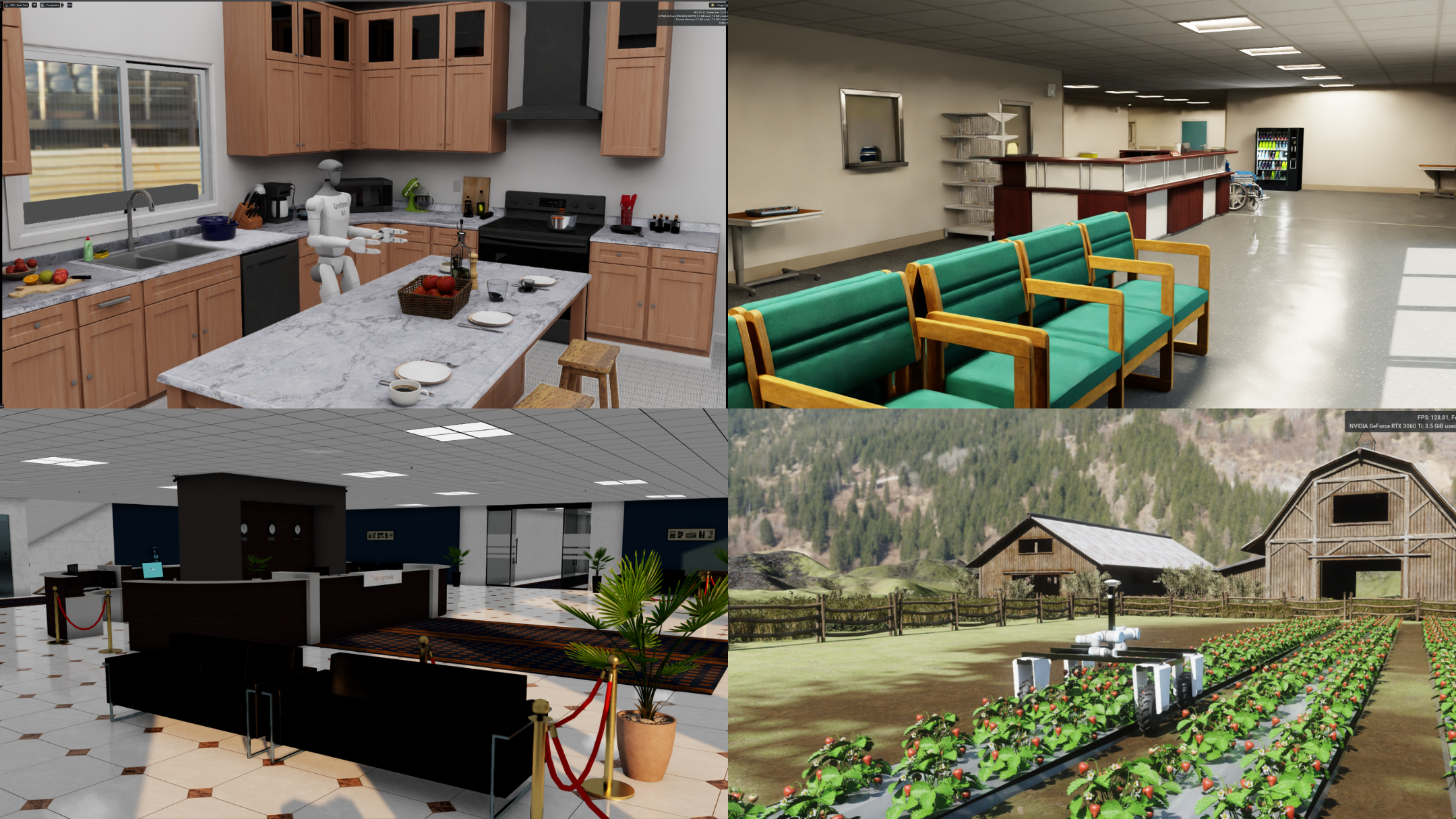 GRID Enterprise currently supports the following environments for the tasks for locomotion and manipulation respectively:
1. **Groundplane** – A simple flat surface environment, ideal for testing basic robot movement.
2. **Warehouse** – A storage area with shelving units and objects that can be placed on them.
3. **Full Warehouse** – A more extensive warehouse setting featuring additional shelves and objects.
4. **Hospital** – A medical facility with multiple rooms and designated spaces.
5. **Office** – A workspace environment with rooms and an open-plan layout.
6. **Strawberry Farm** – An outdoor farming area featuring rows of strawberry plants, pathways for movement, and farming equipment.
7. **Tabletop** – A small-scale environment designed for manipulation tasks, featuring a flat surface with objects for interaction. We only support the use of manipulation arms in this environment.
8. **Kitchen** – A larger, more complex environment modeled after a typical home kitchen.
This environment is intended to support more advanced tasks, such as opening and closing cabinets, loading and unloading dishwasher, etc., providing opportunities for both fine-grained and high-level manipulation.
It includes countertops, cabinets, a microwave, a stove, a refrigerator, a dishwasher, and various kitchen utensils or appliances.
9. **Biolab** – A biological laboratory environment equipped with workbenches, pipettes, beakers, test tubes, and cabinets; ideal for fine manipulation and sample-handling tasks.
We are constantly updating our offering of scenes and if you want the scene of your choice to be added to the list, please let us know on our [Discord Community](https://discord.gg/yPtfUNDe5M) or reach out to us on our [email](mailto:info@generalrobotics.company).
## Custom Scenes
Scenes outside of the ones provided can be loaded using USD files. Following is an example of how to add a custom scene by adding it to the scene entity in the `env.yaml`.
```yaml theme={null}
- scene_name:
type: Asset
name: USD
config:
spawn:
usd_path: path_to_usd_here
```
GRID Enterprise currently supports the following environments for the tasks for locomotion and manipulation respectively:
1. **Groundplane** – A simple flat surface environment, ideal for testing basic robot movement.
2. **Warehouse** – A storage area with shelving units and objects that can be placed on them.
3. **Full Warehouse** – A more extensive warehouse setting featuring additional shelves and objects.
4. **Hospital** – A medical facility with multiple rooms and designated spaces.
5. **Office** – A workspace environment with rooms and an open-plan layout.
6. **Strawberry Farm** – An outdoor farming area featuring rows of strawberry plants, pathways for movement, and farming equipment.
7. **Tabletop** – A small-scale environment designed for manipulation tasks, featuring a flat surface with objects for interaction. We only support the use of manipulation arms in this environment.
8. **Kitchen** – A larger, more complex environment modeled after a typical home kitchen.
This environment is intended to support more advanced tasks, such as opening and closing cabinets, loading and unloading dishwasher, etc., providing opportunities for both fine-grained and high-level manipulation.
It includes countertops, cabinets, a microwave, a stove, a refrigerator, a dishwasher, and various kitchen utensils or appliances.
9. **Biolab** – A biological laboratory environment equipped with workbenches, pipettes, beakers, test tubes, and cabinets; ideal for fine manipulation and sample-handling tasks.
We are constantly updating our offering of scenes and if you want the scene of your choice to be added to the list, please let us know on our [Discord Community](https://discord.gg/yPtfUNDe5M) or reach out to us on our [email](mailto:info@generalrobotics.company).
## Custom Scenes
Scenes outside of the ones provided can be loaded using USD files. Following is an example of how to add a custom scene by adding it to the scene entity in the `env.yaml`.
```yaml theme={null}
- scene_name:
type: Asset
name: USD
config:
spawn:
usd_path: path_to_usd_here
```