> ## Documentation Index
> Fetch the complete documentation index at: https://docs.generalrobotics.dev/llms.txt
> Use this file to discover all available pages before exploring further.
# Scene Selection
The "Scene" tab enables users to select the simulation environment in which their robot will operate. Each scene is a digitally constructed space designed to replicate various real-world and abstract environments for comprehensive testing and development of robotic AI skills.
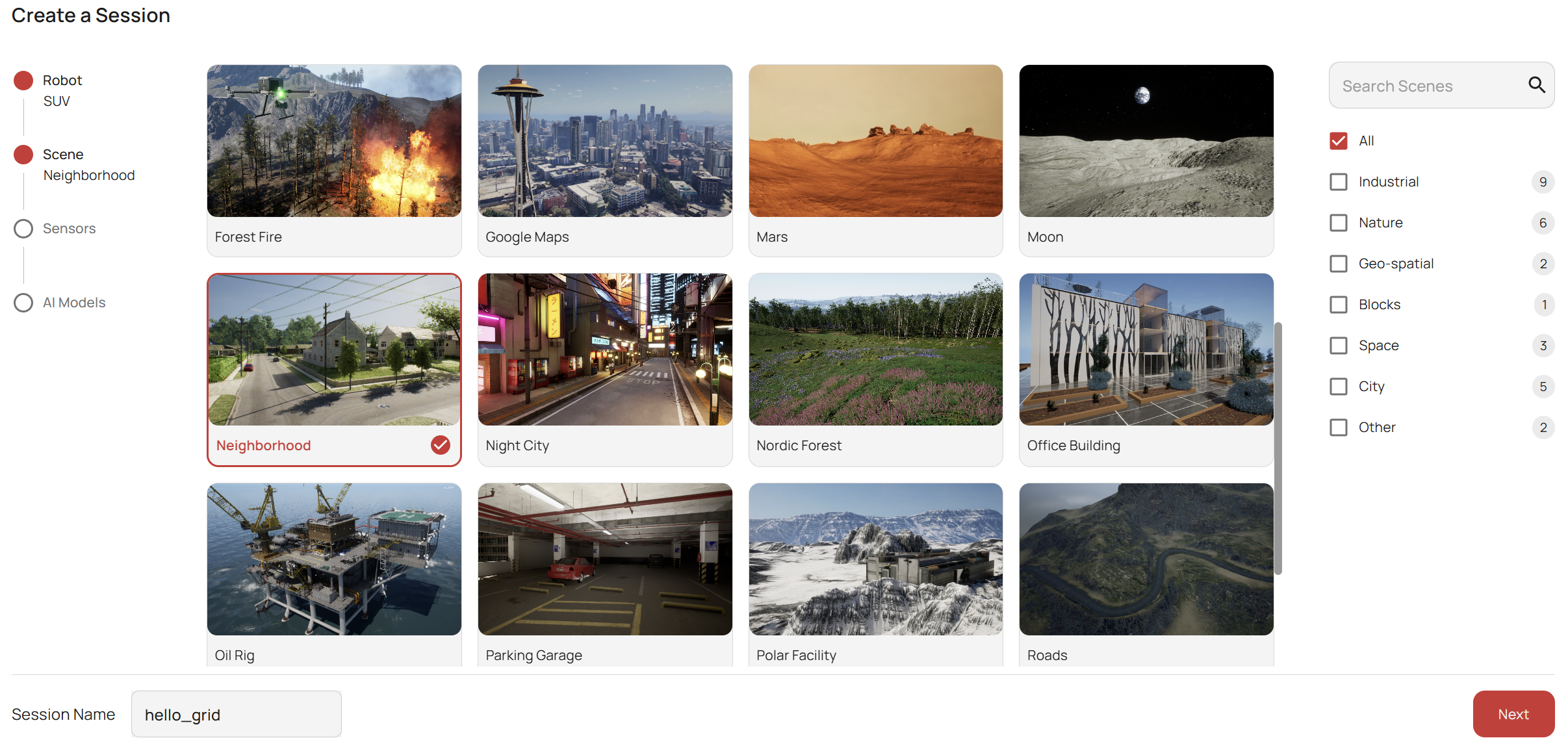 ## Available Scenes
The GRID platform offers a range of scenes, from realistic urban landscapes to controlled testing environments. Users can choose a scene that best suits their simulation goals. We are constantly updating our scene library to provide a diverse range of environments for comprehensive testing and training. Incase you have a specific scene in mind, please feel free to let us know on your [Discord Community](https://discord.gg/yPtfUNDe5M).
The current list of available scenes includes and are not limited to:
* **Abandoned Factory**: Explore an industrial setting with complex structures and varied terrain, ideal for testing navigation and object detection algorithms.
* **Airplane Hangar**: A large, indoor space that is perfect for testing flight control and aerial maneuvering within confined spaces.
* **Beach**: A natural, open environment that tests the robot's ability to navigate and operate on uneven, natural terrain.
* **Bing Maps**: 2D terrain data from Bing Maps, augmented with textured surfaces obtained from satellite imagery.
* **Blocks**: A simplified environment with geometric shapes, providing a controlled setting for basic functionality tests and algorithm training.
* **City Block**: A synthetic urban setting with tall buildings to simulate urban corridors.
* **Construction Site**: A building construction site with several objects, suitable for testing AI in a complicated and cluttered scene.
* **Desert Town**: A complex map of small buildings in a desert, useful for stress testing algorithms such as collision avoidance or SLAM.
* **Electric Central**: A scene with electrical infrastructure elements such as wind turbines, power lines, and solar panels.
* **Factory District**: A factory area with multiple buildings and towers.
* **Forest Fire**: Simulate scenarios for search and rescue operations within a forest under fire, challenging AI with dynamic elements.
* **Google Maps**: Leverages real-world mapping data to create accurate urban environments for extensive navigation and urban operation simulations.
* **Moon**: Self-explanatory.
* **Neighborhood**: A residential area that presents the challenges of suburban navigation including pedestrian and vehicular traffic.
* **Office Building**: A large building that can be useful as a test bench for 3D reconstruction or mapping algorithms.
* **Oil Rig**: An offshore environment that tests the robot's ability to operate over water and on complex metallic structures.
* **Parking Garage**: A multi-level structure that challenges navigation and space recognition skills.
* **Powerline Valley**: A scene with a long array of electric towers and powerlines - a challenging scenario with computer vision problems such as thin object detection and segmentation.
* **Roads**: Simulate driving scenarios with a focus on navigation through winding roads.
* **Urban Buildings**: A synthetic urban setting with tall buildings to simulate urban corridors.
* **Warehouse**: A storage area with shelving units and objects that can be placed on them.
* **Full Warehouse**: A more extensive warehouse setting featuring additional shelves and objects.
* **Hospital**: A medical facility with multiple rooms and designated spaces.
* **Tabletop**: A small-scale environment designed for manipulation tasks, featuring a flat surface with objects for interaction. We only support the use of manipulation arms in this environment.
To thoroughly assess your robot's AI performance, test it across a variety of simulation scenes that reflect diverse real-world conditions. This approach ensures your models are robust and adaptable to different environments.
## Selecting a Scene
To select a scene:
1. Click on the thumbnail of the desired environment. The selected scene will be highlighted.
2. Review the scene details and ensure it meets the requirements for the intended simulation tasks.
It is important to consider the robot's capabilities and the types of sensors configured when choosing a scene. Some environments may be more suitable for aerial robots while others for ground vehicles.
Once the scene is selected, users can proceed to configure other aspects of their simulation, including the robot type, camera and sensor configurations, and AI models.
Ensure that your chosen scene aligns with the objectives of your simulation. Inaccurate environment selection can lead to suboptimal testing conditions and non-representative data.
## Available Scenes
The GRID platform offers a range of scenes, from realistic urban landscapes to controlled testing environments. Users can choose a scene that best suits their simulation goals. We are constantly updating our scene library to provide a diverse range of environments for comprehensive testing and training. Incase you have a specific scene in mind, please feel free to let us know on your [Discord Community](https://discord.gg/yPtfUNDe5M).
The current list of available scenes includes and are not limited to:
* **Abandoned Factory**: Explore an industrial setting with complex structures and varied terrain, ideal for testing navigation and object detection algorithms.
* **Airplane Hangar**: A large, indoor space that is perfect for testing flight control and aerial maneuvering within confined spaces.
* **Beach**: A natural, open environment that tests the robot's ability to navigate and operate on uneven, natural terrain.
* **Bing Maps**: 2D terrain data from Bing Maps, augmented with textured surfaces obtained from satellite imagery.
* **Blocks**: A simplified environment with geometric shapes, providing a controlled setting for basic functionality tests and algorithm training.
* **City Block**: A synthetic urban setting with tall buildings to simulate urban corridors.
* **Construction Site**: A building construction site with several objects, suitable for testing AI in a complicated and cluttered scene.
* **Desert Town**: A complex map of small buildings in a desert, useful for stress testing algorithms such as collision avoidance or SLAM.
* **Electric Central**: A scene with electrical infrastructure elements such as wind turbines, power lines, and solar panels.
* **Factory District**: A factory area with multiple buildings and towers.
* **Forest Fire**: Simulate scenarios for search and rescue operations within a forest under fire, challenging AI with dynamic elements.
* **Google Maps**: Leverages real-world mapping data to create accurate urban environments for extensive navigation and urban operation simulations.
* **Moon**: Self-explanatory.
* **Neighborhood**: A residential area that presents the challenges of suburban navigation including pedestrian and vehicular traffic.
* **Office Building**: A large building that can be useful as a test bench for 3D reconstruction or mapping algorithms.
* **Oil Rig**: An offshore environment that tests the robot's ability to operate over water and on complex metallic structures.
* **Parking Garage**: A multi-level structure that challenges navigation and space recognition skills.
* **Powerline Valley**: A scene with a long array of electric towers and powerlines - a challenging scenario with computer vision problems such as thin object detection and segmentation.
* **Roads**: Simulate driving scenarios with a focus on navigation through winding roads.
* **Urban Buildings**: A synthetic urban setting with tall buildings to simulate urban corridors.
* **Warehouse**: A storage area with shelving units and objects that can be placed on them.
* **Full Warehouse**: A more extensive warehouse setting featuring additional shelves and objects.
* **Hospital**: A medical facility with multiple rooms and designated spaces.
* **Tabletop**: A small-scale environment designed for manipulation tasks, featuring a flat surface with objects for interaction. We only support the use of manipulation arms in this environment.
To thoroughly assess your robot's AI performance, test it across a variety of simulation scenes that reflect diverse real-world conditions. This approach ensures your models are robust and adaptable to different environments.
## Selecting a Scene
To select a scene:
1. Click on the thumbnail of the desired environment. The selected scene will be highlighted.
2. Review the scene details and ensure it meets the requirements for the intended simulation tasks.
It is important to consider the robot's capabilities and the types of sensors configured when choosing a scene. Some environments may be more suitable for aerial robots while others for ground vehicles.
Once the scene is selected, users can proceed to configure other aspects of their simulation, including the robot type, camera and sensor configurations, and AI models.
Ensure that your chosen scene aligns with the objectives of your simulation. Inaccurate environment selection can lead to suboptimal testing conditions and non-representative data.